

Add a storage target
Add an S3-compatible bucket
Section titled “Add an S3-compatible bucket”-
Open Storage › Storage targets and click New target
-
Choose S3-compatible bucket, give it a Name, and pick the S3 flavor
MinIO, SILO, SeaweedFS, Garage, Ceph RGW, AWS S3, Wasabi, Backblaze B2, Cloudflare R2 or Other. The flavor only sets defaults - shown in a table - and the probe confirms what the storage really supports.
-
Fill in Endpoint, Region, Bucket and an optional Prefix
Leave the endpoint empty for AWS itself. Plain
http://is allowed only for a lab target, never in Production. -
Enter the keys
Give the writer key no delete permission. A separate pruner key deletes expired backups; a reader key is used for restores. Stored keys are never shown again.
-
Set the policy
Which environments may use it (empty = all), whether artifacts here must, may or must not be encrypted, how long download links last, and an optional Quota with a Warn at percentage.
-
Save - then Test connection from the list
When the health check passes, the target counts on the first-run checklist.
Add a local or mounted directory
Section titled “Add a local or mounted directory”-
Choose Local or mounted directory and enter an absolute Directory
It must be owned by the platform’s service account (UID 1654 in the container).
-
Click Check its filesystem
A directory on the same disk as the platform is flagged Not independent: it dies with the platform’s disk and never counts toward 3-2-1.
-
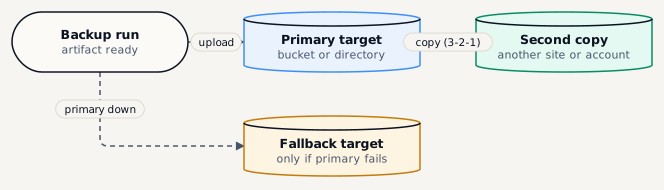
Optionally switch on Fallback
Runs then write here when their primary target fails, so a storage outage does not leave a gap.
Reading the list
Section titled “Reading the list”| Column | Tells you |
|---|---|
| Health | The last health check: reachable, writable, and with the expected settings. |
| Capacity | Used space against the quota; locked and pending-deletion parts are shaded. |
| Reconciliation | Whether the bucket still matches the catalogue - nothing missing, nothing unknown. |
| Chips | Fallback, Lab, Disabled, Not independent, encryption policy and Object Lock mode. |