

Encryption and keys
The four choices
Section titled “The four choices”| Mode | What opens the backup | Best for |
|---|---|---|
| Platform key (recommended) | The platform - or, without it, the recovery kit and bmctl. |
Everyday backups. Nothing to remember, strongest format (BMENC: AES-256-GCM, one random key per artifact). |
| Password | The password, with standard tools: gpg for tar and native files, any AES-zip tool for zip, 7zz for 7z. |
Backups you hand to someone outside the platform. |
| Public key | One recipient’s OpenPGP private key, supplied when you restore. The platform itself cannot open it. | Escrow and compliance: an operations key plus an escrow key is a good pair. |
| None | Anyone who can read the storage. | Data that is already public, or test data. Shows a lasting warning; Production needs a written reason. |
How the platform key works
Section titled “How the platform key works”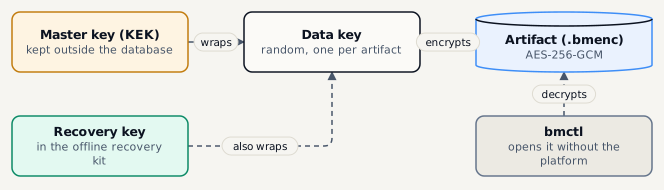
- Each artifact gets its own random data key. The data key is stored with the artifact, wrapped by the master key (KEK).
- The master key lives outside the database - a file, an environment variable or a Docker secret. A stolen database alone opens nothing.
- The recovery key wraps the data key as well. It is in the offline recovery kit, so
bmctlcan open artifacts when the platform is gone. - Rotating the master key re-wraps the data keys only - no backup is re-encrypted. Rotate every 12 months, and at once if you suspect a leak.
Passwords
Section titled “Passwords”- By default the platform generates a strong password (24+ characters) and shows it once - copy it and confirm you stored it.
- You can type your own instead: at least 16 characters, longer is better.
- Zip with a password keeps file names visible and uses a weaker key derivation - prefer tar or 7z when that matters.
Rules that decide for you
Section titled “Rules that decide for you”An environment can require encryption, and a storage target can require, allow or forbid it. The stricter rule wins: options that break a rule are greyed out with the reason, and a plan that breaks one cannot be saved or run.