

Files
Whole folders or chosen files, back in place or to another path or server.
Files
Whole folders or chosen files, back in place or to another path or server.
Volume
A Docker or Podman volume, the original or a new one.
Container or stack
A container’s filesystem or a compose project.
Database
Into the original instance, under another name, another instance, or a new container of the dump’s version.
Download only
Get the files without writing to any server.
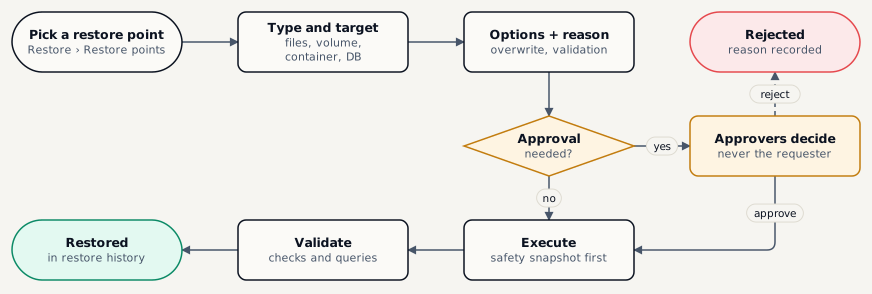
| Step | Who | Permission |
|---|---|---|
| Request a restore | Restore Operator or Administrator | Restore › Request |
| Approve or reject | Administrator or a custom approver role - never the requester | Restore › Approve |
| Execute an approved restore | Restore Operator or Administrator | Restore › Execute |
Safety snapshot
Before overwriting, the target is backed up and kept 14 days. If that fails, the restore stops.
Roll back
A failed or cancelled restore offers Roll back from safety snapshot - a new request with the usual approvals.
Validation
Database restores run the engine’s checks and compare row counts; your read-only queries run after them.
Approvals expire
An approval older than 24 hours sends the request back for approval.